
TL;DR:#
Keyd is a powerful system wide key remapping daemon. If a key on your keyboard is physically broken (a “dead key” in hardware terms), you can easily remap a rarely used key (like Caps Lock) to perform its function using Keyd.
Hardware fails. It’s an unfortunate reality of technology. On a laptop, a broken keyboard key can be a nightmare replacing the entire top case is often expensive or difficult.
Recently, the Esc key on my keyboard stopped working. As a frequent Vim user, this was catastrophic. The Esc key is essential for switching modes.
My solution? Keyd.
Keyd is a key remapping daemon for Linux that works at the kernel level (using uinput). This means your remappings work everywhere: in the terminal (TTY), in X11, and in Wayland, making it the perfect tool for bypassing broken keys.
Installation#
Here is how you can install Keyd on the most popular Linux distributions.
Arch Linux (Pacman)#
Keyd is available in the official repositories (extra).
sudo pacman -S keydUbuntu / Debian (APT)#
For Ubuntu 24.04 and newer, you can often find it in the repositories. For a more streamlined experience or older versions, you can use the official PPA.
sudo add-apt-repository ppa:keyd-team/ppa
sudo apt update
sudo apt install keyd
Fedora (RPM)#
Fedora users can install Keyd via a COPR repository.
sudo dnf copr enable alternateved/keyd
sudo dnf install keydConfiguration#
After installation, the configuration is handled in a single file: /etc/keyd/default.conf. You will likely need to create this file and the directory if they don’t exist.
Identifying Keys#
Before configuring, it’s helpful to know how Keyd sees your keyboard input. You can use the monitor tool to identify key names:
sudo keyd monitor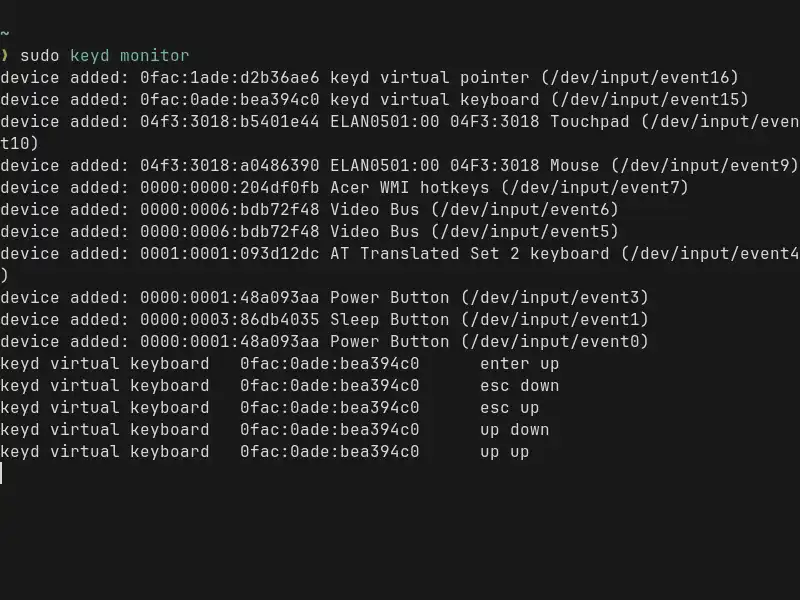
Press any key to see its identifier. Press Ctrl+C to exit.
Remapping Caps Lock to Esc#
In my case, the Esc key is physically dead. I chose to sacrifice the Caps Lock key to take its place.
Why Caps Lock?
- It is located on the “home row” (next to ‘A’), making it very ergonomic.
- I rarely use Caps Lock intentionally (Shift is sufficient for capitalization).
Here is how to configure it:
Open or create the config file:
sudo vim /etc/keyd/default.confPaste the following configuration:
[ids]
*

[main]
# Remap the physical Caps Lock key to function as Escape
capslock = esc
Explanation:
[ids] *: Tells Keyd to apply these rules to all connected keyboards.[main]: The default layer.capslock = esc: When you press the physical Caps Lock key, the system receives an Esc signal.
Applying Changes#
Once you have saved your configuration file, you need to enable and start the service to apply the remapping.
sudo systemctl enable keyd --nowIf you modify the configuration file later, simply reload Keyd to apply the changes instantly without rebooting:
sudo keyd reloadWith this setup, a broken key is no longer a productivity blocker. Your muscle memory might take a day or two to adjust, but having a functional “Esc” key back in an even better position is well worth it.